
If Spellbook no longer fits how your legal team drafts and reviews contracts, the fix is usually a category swap, not a vendor hunt. Teams that live inside Microsoft Word do best with a Word-native copilot. Teams reviewing contracts at portfolio scale, across intake, negotiation, and renewal, tend to outgrow Word entirely and need a web-first CLM or contract platform instead.
There are five broad categories worth knowing: Word-native copilots, standalone drafting apps, CLM/contract platforms, specialist tools built for a narrow job like litigation prediction, and open-source or free options for teams that want control over their data. None of these is universally "best." The right one depends on where your bottleneck actually lives, in the drafting moment or in tracking hundreds of live agreements.
Run two tests before you sign anything:
- Pilot one free Word-native tool against a batch of several real contracts you've already redlined, so you can compare its suggestions to your own edits.
- Pilot one web-based CLM or contract platform on a small live deal to see how it handles playbooks, batch review, and reporting outside Word.
Vendor roundups consistently point to this same paired approach, testing a Word-native option alongside a web or CLM alternative before committing procurement budget to either.
Which Category of Spellbook Alternatives Fits Your Workflow?
Every alternative to Spellbook falls into one of five buckets, and each one solves a different problem well. Confusing them is the most common procurement mistake legal ops teams make.
Word-native copilots live inside Microsoft Word as add-ins, mirroring Spellbook's own approach: they suggest edits, flag risky clauses, and let you accept or reject changes without leaving your document. Best for solo attorneys and small legal teams whose entire workflow already runs through Word and redlining.
Standalone drafting apps run in a browser and generate contracts from templates or prompts rather than editing an existing Word file. Best for teams that draft from scratch frequently and don't mind working outside Word.
CLM and contract platforms manage the full agreement lifecycle: intake, negotiation, e-signature, renewal reminders, and reporting across hundreds or thousands of live contracts. Best for legal ops teams and in-house counsel managing a portfolio, not a single deal at a time.
Specialist tools focus on one narrow legal task, litigation outcome prediction, deposition summaries, or role-specific contract explainers. Best as a complement to your primary drafting tool, not a replacement for it.
Open-source or free options give you a no-cost or self-hosted alternative with more control over where your data lives. Best for teams with in-house technical resources willing to trade vendor support for privacy.
Workflow badges to keep in mind as you shortlist:
- Word-native, browser-first, or hybrid (works in both)
- Enterprise-ready (SOC 2 or ISO certified, SSO, audit logging)
- Low-cost or free-tier available
Multiple industry roundups organize Spellbook alternatives along these same category lines rather than ranking a single "best" vendor, because workflow fit consistently outweighs any generic feature comparison.
What Should Legal Teams Check Before Switching Tools?
A checklist beats a demo. Sales calls are optimized to show you the best-case scenario; a structured evaluation exposes what actually breaks when you use the tool on your own contracts.
- Workflow fit. Does the tool live in Word, a browser, or both? A hybrid tool that supports Word exports still counts as Word-native for adoption purposes, since your attorneys never have to change where they work.
- Batch and portfolio capability. Can it review multiple documents at once and generate a summary report, or is every review a one-off session? This matters enormously once you're past a handful of active deals.
- Playbooks and clause libraries. Can you load your firm's or company's approved clause language and have the tool flag deviations automatically, rather than relying on generic risk categories?
- Security and compliance. Ask directly for SOC 2 Type II or ISO 27001 certification, data retention policy, and whether your documents train the vendor's models. This is not a courtesy question; it's a procurement requirement.
- Integrations. Does it connect to your CLM, e-signature platform (DocuSign, Adobe Sign), and matter management system, or does it require manual export and import at every step?
- Pricing structure and hidden costs. Is it seat-based, usage-based, or per-document? Ask what happens when you exceed a query cap mid-contract.
Pro Tip: Ask each vendor to run their tool on the same three contracts you feed every competitor. Side-by-side output on identical documents exposes accuracy and false-positive gaps that a canned demo never will.
Legal teams increasingly want tools tied to real precedent rather than a generic language model guessing at risk. That's part of why specialized legal research platforms built on deep legal corpora are gaining ground over general-purpose AI wrappers.
How Do Word-Native, CLM, and Specialist Tools Compare?
Each category earns its place for a different reason, and each has a real ceiling.
Word-native copilots replicate the Spellbook experience most closely: in-document suggestions, redlining assistance, and clause-level risk flags without breaking your existing review habit. The tradeoff is scale. These tools are built for one document at a time. Ask a Word-native copilot to summarize risk trends across 200 active vendor contracts and you'll hit a wall fast, because that's simply not the job it was built to do.
Standalone drafting apps shine when you're generating contracts from a template library rather than editing inherited paper. Browser-first teams, particularly younger legal ops functions built without a Word-centric legacy, often prefer these because everything, drafting, commenting, and version history, lives in one interface. The catch is redlining an opposing party's Word document usually still requires an export step, which can undercut the "no Word needed" pitch in practice.
CLM and contract platforms add the lifecycle features Word-native tools skip entirely: renewal alerts, obligation tracking, e-signature routing, and portfolio-level reporting. This is where legal ops teams managing hundreds of live agreements actually see return on investment. The rollout cost is real, though. Enterprise CLM implementations often take months, involve IT resources, and require the whole organization, not just legal, to change how contracts get routed and approved.

Specialist tools solve one job precisely, litigation outcome prediction or plain-language contract explainers for non-lawyers, but they're additive, not foundational. Treat them as a layer on top of your primary drafting or review tool, not a reason to skip evaluating the core categories above.
Open-source and free options offer genuine privacy advantages: self-hosted models mean your contract data never leaves infrastructure you control. Projects like Camel AI show this is a viable path, but the tradeoff is maintenance. There's no vendor support line to call when the model misfires, and your team owns every update and security patch going forward.
General-purpose writing assistants deserve a mention here too, mostly as a caution. Tools like Grammarly's AI writer speed up prose and catch grammatical issues, but they carry no legal precedent, no clause benchmarking, and no risk-flagging logic. They're fine for polishing tone in a cover letter accompanying a contract. They are not a substitute for actual legal risk review.
What Does a Realistic Switching Timeline Look Like?
Migrating off Spellbook, or any incumbent drafting tool, goes smoothly when you treat it as a data-preservation project first and a feature comparison second.
- Export what you can't recreate from memory. Clause libraries, saved playbooks, and audit logs of past AI suggestions are the hardest things to rebuild. Pull these before you cancel anything.
- Scope a real pilot, not a demo. Pick 10 to 15 actual contracts spanning your typical range, a vendor NDA, a services agreement, a licensing deal, and run them through the new tool with two or three actual reviewers, not just an admin.
- Set success metrics up front. Time saved per document, the false-positive rate on flagged clauses, and reviewer satisfaction are all measurable within a two-week pilot window.
- Map your integration needs before you sign. Confirm the new tool connects to your matter management system, your document management system, your e-signature platform, and that user provisioning through SSO actually works as advertised, not just as a roadmap item.
Pro Tip: Run your pilot on contracts you've already finished reviewing manually. Comparing the tool's output against edits you already made is a far more honest accuracy test than reviewing a brand-new document where you have no baseline.
The most common procurement trap is skipping the pilot's integration test and discovering, post-contract, that the tool can't actually talk to your CLM or e-signature platform. Pairing a lightweight Word pilot with a small CLM pilot side by side tends to surface which one your team actually needs, in-document speed or portfolio-level tracking, faster than either pilot alone.
How Much Does an AI Contract Tool Typically Cost?
Pricing models vary enough that "how much does this cost" rarely has a one-line answer, and that's by design on the vendor side.
Seat-based licensing charges per named user monthly, which is predictable for budgeting but can get expensive fast if only a handful of your seats are heavy users. Usage-based pricing charges per query or per document processed, which rewards light users but can spike unpredictably during a busy deal quarter. Per-document licensing sits in between, useful for teams with a stable, forecastable contract volume.
Watch for trial limitations that quietly undercut the evaluation:
- Query caps that run out mid-pilot, right when you need to test batch review
- Integrations disabled in the trial tier, so you can't actually test the CLM or e-signature connection that matters most
- Single-user trial accounts that prevent you from testing how multiple reviewers collaborate
When you do run a proof-of-value, track three numbers: time saved per contract, the false-positive rate on risk flags (how often the tool cries wolf on a clause that's actually fine), and throughput across a batch. Ask sales directly what happens to your data during the trial and whether trial documents are retained after you cancel. Free Word-native tools are frequently used as this first, low-cost test step before committing to a paired enterprise evaluation.
Where Does BlackX Fit These Evaluation Criteria?
BlackX approaches contract review from a different angle than the categories above, because it's built specifically for the deal shapes creators and brands actually sign, not general commercial contracts.
- Clarity scoring instead of generic redlines. BlackX's 100-point contract clarity score gives creators and brand partners a fast, numeric read on how balanced a deal actually is, rather than a wall of flagged clauses with no ranking.
- Red-flag detection tuned to creator deals. Rather than generic legal risk categories, the flags map to the terms that actually recur in influencer and licensing agreements, usage rights, exclusivity windows, payment triggers.
- Automated counter-proposal generation. Instead of just telling you a clause is unfavorable, BlackX drafts a counter-position you can send back, closing the gap between detection and negotiation.
- Black X Verified, a trust badge for creators and brands that meet transparency standards, functions similarly to a compliance signal in enterprise procurement.
BlackX's own research on tools for managing creator partnerships covers this workflow in more depth, including how clarity scoring compares to manual legal review for high-volume deal flow.
Creator-brand deals rarely need full CLM infrastructure. They need fast, confident answers on whether a specific deal term is fair, benchmarked against what similar creators are actually signing.
A pilot with BlackX typically starts with running a handful of live brand deals through the scoring engine to compare its flags against what outside counsel or an experienced manager would catch manually.
What Legal Teams Get Wrong About Choosing a Spellbook Replacement
The conventional advice treats this as a bake-off: line up five tools, score them on a feature grid, and pick whichever wins the most rows. That approach breaks down because Word-native copilots and CLM platforms aren't competing for the same job. Scoring them against each other on "batch review capability" penalizes a tool that was never built to do that, and the grid quietly hides the one question that actually matters: where does your review bottleneck live?
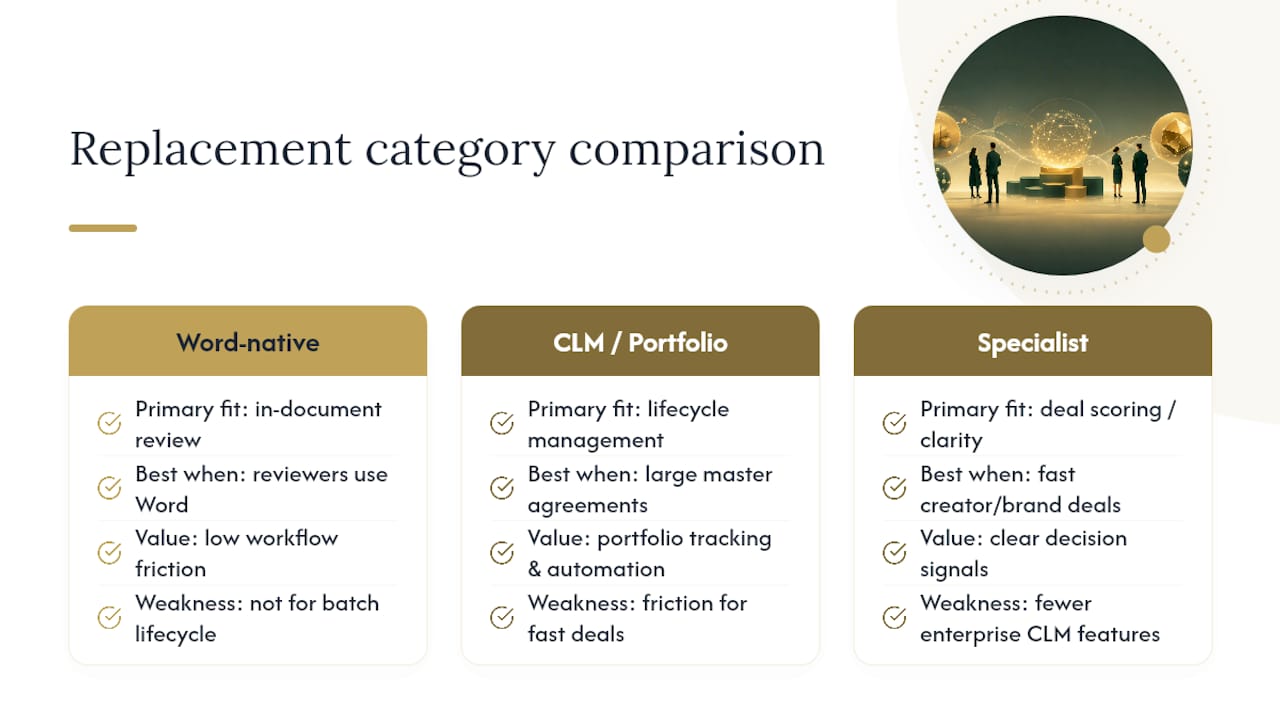
Most legal teams overrate feature checklists and underrate workflow friction. A tool with more capabilities that nobody opens because it lives outside their existing habits delivers zero value. The teams that switch successfully pick the category first, Word-native versus portfolio platform versus specialist, and only then compare vendors within that lane.
For creator and brand deal work specifically, general contract platforms miss the point entirely. These deals move fast, involve non-lawyers making judgment calls, and need a clarity signal, not a lifecycle management system built for hundred-page master service agreements. That's the gap tools like BlackX's approach to deal scoring are built to close, and it's worth testing before assuming an enterprise CLM is the only serious answer.
— Brian
Try BlackX If Deal Clarity Is Your Actual Bottleneck
If your contract problem is really a creator-brand deal problem, negotiating usage rights, exclusivity terms, and payment structures against benchmarks you can't easily find elsewhere, BlackX solves a different problem than the Word-native and CLM tools covered above.

BlackX gives you a 100-point contract clarity score, automated red-flag detection tuned to creator and brand deal terms, industry benchmarking against comparable deals, and automated counter-proposal drafting so you're not starting a negotiation response from scratch. Creators and brands who meet transparency standards can also earn Black X Verified status, a trust signal for the other side of the table. If you're managing enterprise-wide contract lifecycle across thousands of vendor agreements, an enterprise CLM is still the right heavy-lift tool. But if your actual daily work is evaluating and negotiating creator or brand partnership terms, that's exactly what BlackX was built for. Check your first deal's clarity score on the BlackX creator platform to see where you stand before your next negotiation.
Sources
- Meet Westlaw Advantage: the next-generation AI legal research solution (Thomson Reuters blog)
- Best Spellbook Legal AI Alternatives on HyperStore
- Seektool
- Grammarly AI writer
FAQ
How Expensive Is Spellbook AI?
Spellbook prices by seat and typically requires a sales conversation for exact enterprise quotes rather than publishing flat self-serve pricing, so cost varies by firm size and contract volume.
Which Is the Best AI for Legal Use?
There is no single best tool: Word-native copilots suit attorneys who redline inside Word, CLM platforms suit teams managing large contract portfolios, and BlackX suits creators and brands who need deal clarity scoring rather than enterprise lifecycle management.
How Much Does Luminance Cost?
Luminance does not publish flat public pricing; like most enterprise contract AI platforms, it requires a custom quote based on seat count and deployment scope.
What Is Spellbook Legal AI?
Spellbook is a Word add-in that assists with contract drafting and redlining directly inside Microsoft Word, using AI to suggest edits and flag risky clauses in-document.
What Should I Ask a Vendor Before Switching Tools?
Ask about SOC 2 or ISO certification, whether your documents train their models, integration support for your CLM and e-signature platform, and what happens to your data if you cancel the trial.